Production Templates
Overview
Production templates are groups of production template tasks that define the manufacturing workflow for specific products. These templates serve as blueprints that standardize the production process, ensuring consistency and efficiency across your manufacturing operations.
What are Production Templates?
A production template is a structured sequence of tasks that outlines the complete manufacturing process for a product. Each template contains multiple production tasks that define:
- The order of operations
- Required workstations
- Estimated completion times
- Assigned technicians
- Dependencies between tasks
When a product is added to a case, Pilot automatically uses the product's default production template to generate a complete production schedule.
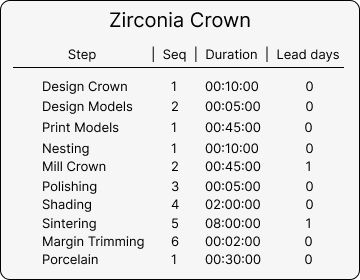
This is an example of a production template for manufacturing a Zirconia Crown, displaying the sequential tasks and their organization within the template structure. Each task is assigned to appropriate workstations with specific time allocations and sequence ordering.
Creating a Production Template
Navigation
To create a new production template:
- Navigate to Admin → Production Flow → Production Templates
- Click the "Add Template" button
Required Information
When creating a production template, you must specify:
- Template Name: A descriptive name that clearly identifies the template's purpose (e.g., "Zirconia Crown", "Metal Framework", "Full Denture")
Adding Production tasks
After creating your production template, you can add individual production tasks that define the manufacturing workflow. Each task includes:
- Task Name: Descriptive name for the production task
- Sequence: Order in which the task should be performed
- Workstation: The specific workstation where the task will be completed
- Duration: Estimated time required to complete the task
- Estimated Days: Number of days allocated for completion
Assigning Templates to Products
Once your production template is created and configured with tasks:
- Navigate to the products page
- Assign the production template to the relevant products
- Set one template as the default template for each product
The default template will be automatically selected when the product is added to a case.
Production Schedule Generation
When you add a product to a case, Pilot performs the following automated actions:
- Template Selection: Retrieves all production tasks from the product's default template
- Schedule Creation: Generates a comprehensive production schedule for the case
- task Assignment: Includes all required tasks with their specifications
- Technician Allocation: Assigns technicians to each task based on workstation settings
- Timeline Planning: Calculates completion dates for each task based on duration estimates
Example: Zirconia Crown Template
The image below shows a production template called "Zirconia Crown" that demonstrates how multiple manufacturing tasks are organized within a single template. This template would include sequential tasks such as design, milling, sintering, and finishing, each assigned to appropriate workstations with specific time allocations.
This example shows how production tasks are organized within a template, displaying the sequence of operations required to manufacture a zirconia crown from initial design through final completion.
Benefits of Using Production Templates
- Standardization: Ensures consistent manufacturing processes across all cases
- Efficiency: Automatically generates detailed production schedules without manual planning
- Resource Management: Optimizes workstation utilization and technician assignments
- Quality Control: Maintains consistent workflow standards for each product type
- Time Management: Provides accurate scheduling based on predefined duration estimates
Best Practices
- Create specific templates for each distinct product type
- Regularly review and update task durations based on actual completion times
- Ensure proper sequencing of dependent tasks
- Assign appropriate workstations based on equipment and skill requirements
- Test new templates with sample cases before full implementation